This work instruction is part of the guide Setting up your insurance solution.
Prolongation is an important process within the world of insurance. Prolongating (renewing) an insurance policy means extending it.
In Novulo, this process consists of three steps:
1. Test prolongation
2. Prolongation
3. Invoicing
Test prolongation
During the trial renewal process, a new draft version is created for each policy that renews on the contract expiration date within the specified period (usually one month). For each version, it is determined whether a switch to a new product version is necessary, and the internal or external calculation box is invoked to calculate the new premium. A new expected invoice is prepared for all versions that renew on the premium expiration date.
Prolongation
During the renewal process, all newly created draft versions are finalized. All contract documents (e.g., the policy schedule) are generated, and an expected invoice for the first period is prepared for each version. These invoices are invoiced together with the expected invoices for the insurance policies that renew on their premium due dates. The result of this step are the draft invoices.
Invoicing
In this step, the draft invoices are finalized. A distinction can be made between premium and commission invoices. An invoice document is generated for all invoices and the invoices are posted to the general ledger. The premium due date of the insurance policies is incremented.
Finally, the direct debit file can be generated, after which the invoices can be sent electronically.
- In the main menu, navigate to the tile ‘Prolongation periods’
- A new tab will open with a list of the different prolongation periods
- Select the prolongation period that needs to be processed. A new tab will open. This overview shows more information about the policies being updated and the steps taken in the prolongation process
- Select the tile ‘Test prolongation’ to start the trial prolongation process
- The ‘Log’ shows that the test prolongation has started. It will also show when this action is completed
- Results of the test prolongation can be found under ‘Prolongation’ in the overview

- Select a renewal to open it and check the results
- Select the tile ‘Mark as ready to process’ to start the next step in the prolongation process. Repeat for every renewal in the list
- Return to the overview and select the tile ‘Prolong & Invoice’
- The draft versions that were created are now finalized. Contract documents are generated and both the premium and commission invoices are created
- The progress of this process can be viewed in the ‘Log’
- The final step in the prolongation process consists of finalizing the invoices and transferring these bookings to the administration department. Select the tile ‘Finalize invoices’


The direct debit file can now be generated and the invoices can be sent via chain communication.
Indexation
Indexation is the process of determining the value of an object. This can be used to determine the appropriate insurance premium.
Within insurance, there are at least two common indexation methods:
1. Indexation of the insured amount
2. Premium indexation
Indexation of the insured amount
In Novulo, you can set up an index table and link it to an index template. This template is then linked to a sales price list item.
- In the main menu, navigate to the tile ‘Settings’
- Go to ‘Index tables’
- Select the plus in the upper right corner to add a new table
- An index table can be based on either a percentage or a number (for example the ‘CBS index’ or ‘Bedrijfsgebouwen index’)
- On the renewal date (depending on the setup) the current index figure is compared to the index figure from exactly one year before
- Example: the index figure is now 180, whereas a year ago it was 170. Upon renewal, the value from the selected field in the index template (usually ‘Insured amount’) is increased by the amount of the sum of 180/170
- The employee of an authorized insurer can periodically (monthly/quarterly/annually) update the index table with the latest figures
- The index table is now linked to an insured amount and other business rulings via an index template
- Go to ‘Index templates’ in the ‘Settings’
- Create a new template by selecting the plus in the upper right corner
- A new tab will open
- An index template is then linked to a sales price list item



Premium indexation
- For periodic/annual premium indexation a new calculation box (calculation sheet) has to be created. The new calculation sheet should include the indexed premiums
- Next, a new product version is created (a new product version is equivalent to a new version of a sales price list item; sales price list items have extensive versioning options)
- The new calculation box can be linked to the new version of the sales price list item
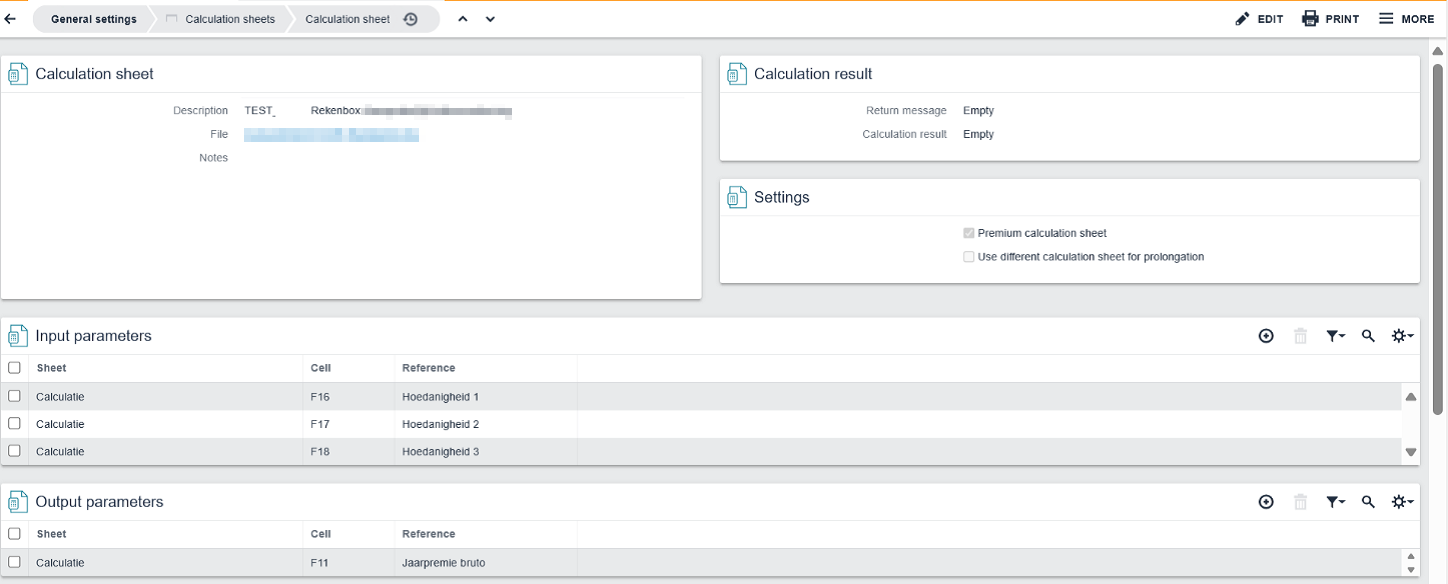

On the renewal date the system checks which product version is currently active. The contract that is to be renewed accesses the calculation box of the sales price list item that is active at the time of renewal. This way, the correct indexed premium is calculated upon renewal.